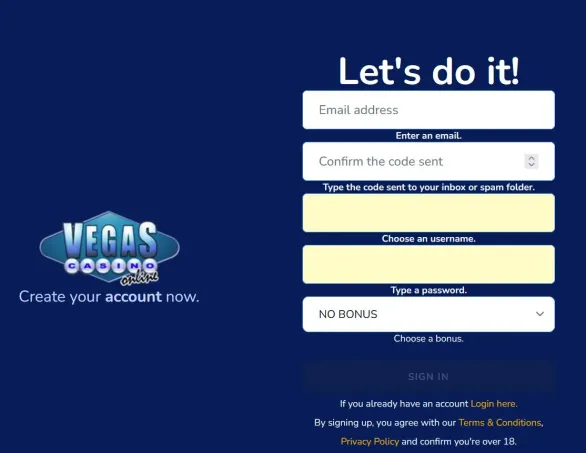

Starting Registration
To open an account with us, hit Sign Up in the top-right corner of the site. We ask for a working email, a password of at least eight characters with upper and lower case letters, numbers and symbols, plus your full legal name, home address, date of birth and preferred currency. Choosing CAD here is important so later you avoid conversion fees on every payment. If you have details ready, the whole form usually takes around a couple of minutes.
Right after sending the form, head to your inbox and look for our confirmation email. You need to click the activation link within 24 hours, otherwise the registration attempt just expires. After you press the link, you land on the login page and can sign in straight away with the email and password you set. Until this confirmation is done, the profile stays restricted and deposits or real-money play are blocked.
What Information We Collect
During signup we collect your first and last name, full residential address with postal code and province, plus your date of birth in DD/MM/YYYY format. For contacts we need an email you actually use and a mobile number with the Canadian country code. Our forms check that the email format is valid while you type and will show an error if an address is already registered.
Password requirements are strict on purpose. It must be at least eight characters and include upper and lower case letters, digits and at least one special symbol. Weak combinations are refused with a short error note. We never keep your password in plain text - it is stored in encrypted form. If you want to update it later, go to My Account and open Security Settings.
For players in Canada, currency is locked to CAD as soon as you complete activation, helping payments line up with local banking. You cannot change this afterwards so it is worth checking twice before you confirm. In the same area you can also set communication preferences and decide if you want promo emails or SMS about bonuses or not.
Email Confirmation
We send an automated message within a few minutes with subject line “Activate Your Account”. The verification link inside works for 24 hours. Once you click, your email ownership is confirmed and the account switches to full functionality. If the email does not appear in the inbox, check your spam or junk folders and, if needed, add our domain to your safe senders.
If the link times out, you can ask for a new one from the login page. Try to sign in with the unverified account and then use the “Resend Verification Email” option that pops up. Too many failed attempts in a row may cause a short temporary lock, in that case our support team helps to restore access.
After successful verification, you arrive in your account dashboard. The wallet will still show a zero balance until you make a first deposit. In the profile section you see the registered name, email, phone and currency, plus simple options to update contact details or add two-factor authentication for extra security.
Identity Documents
Before we can process withdrawals for Canadian customers, regulations require us to confirm your identity and address. We must match the details you gave at registration with real documents. A valid passport, driver’s license or provincial ID is usually enough, as long as the photo is clear, the name readable and the document has not expired.
For proof of address we accept recent utility bills, bank statements or government letters issued within the last three months. The document must clearly show your full name and the same residential address you use on the account. You upload scans or high-quality photos in My Account under the Verification section. Supported formats are JPEG, PNG or PDF and each file can be up to 5 MB.
| Document Type | Requirements | Format |
|---|---|---|
| ID Card | Current, clear photo | JPEG, PNG, PDF |
| Address Proof | Dated within 3 months | Up to 5 MB |
| Processing | 24-72 hours | Email notification |
We usually review documents within 24 to 72 hours, depending on how many requests are in the queue. Once the check is done, we send an email notification. If something is wrong, such as blurry images, expired documents or details not matching your profile, the message explains what needs fixing. You can upload corrected files right away. It is better to complete this verification early so the first withdrawal is not delayed.
Profile Settings and Limits
Inside My Account you can adjust most personal settings. The Profile tab shows your nickname, email, mobile number and address. Contact data can be changed whenever needed, but if you want to modify your name or date of birth, we will likely ask for extra confirmation. By default the site appears in English, though you can switch to French or another available language.
In the communication area, you manage how we reach out to you. Simple toggles let you turn on or off promotional newsletters, SMS updates or push notifications. Turning off marketing messages does not affect essential emails about deposits, withdrawals, passwords or security events.
We place responsible gaming tools right under the Limits section. Here you are able to set daily, weekly or monthly deposit limits in CAD. You can also choose to receive session reminders after a certain playing time. Self-restriction options are available too, from a short 24-hour pause to breaks of several months or even permanent exclusion. New or lower limits apply immediately, while raising an existing limit only becomes active after a 24-hour waiting period.